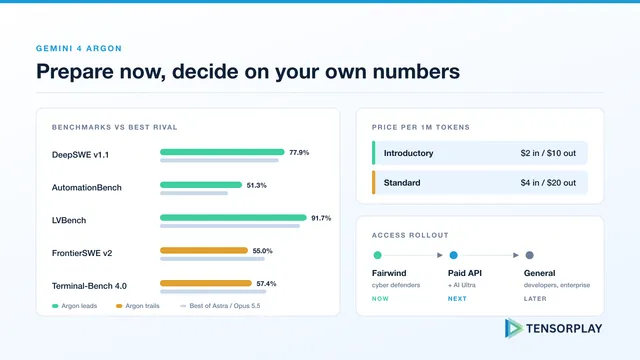
Gemini 4 Argon: Get Ready Before You Can Call It
Gemini 4 Argon for production AI teams: benchmarks against GPT-6 Astra and Opus 5.5, pricing that doubles after launch, 1M output tokens and a readiness plan.
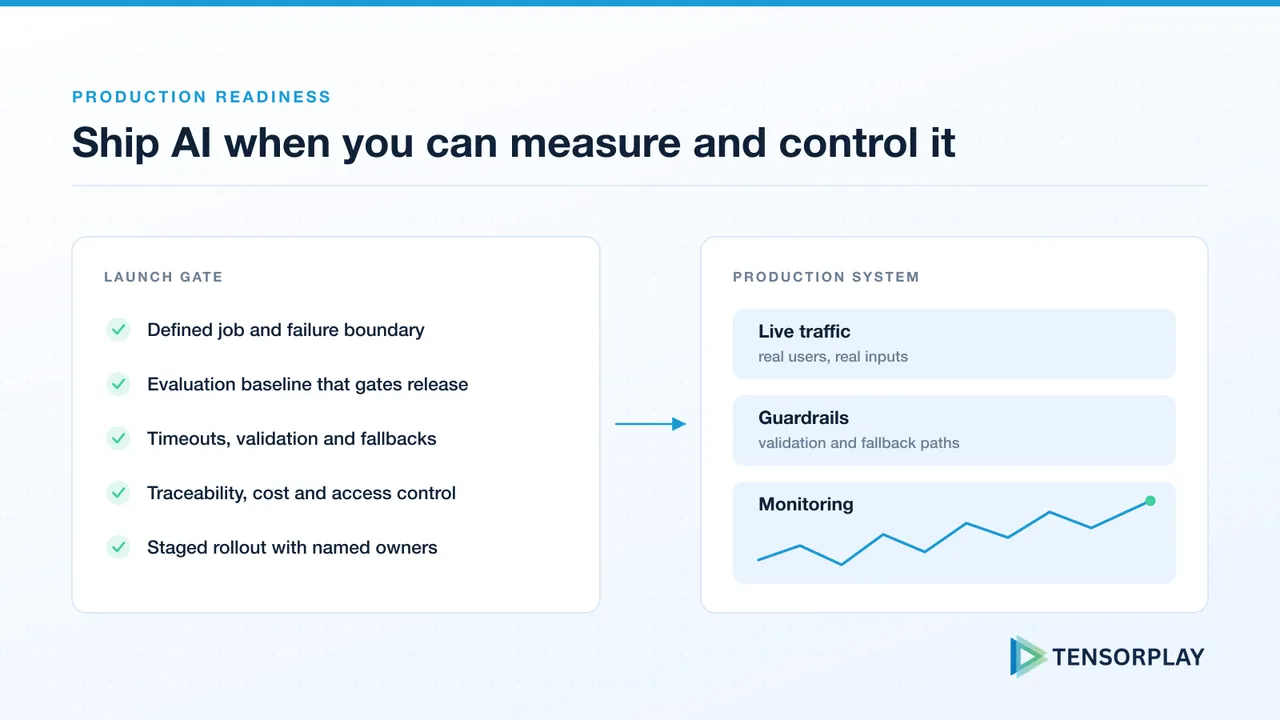
A practical way to decide whether an AI feature is ready for real customers, not just a convincing demo.
Every week a team demos a new LLM-powered product and it looks brilliant. The model answers accurately, the interface feels quick, and the room is impressed. Then it launches to real users, and things start to break.
The gap is predictable. A demo controls the inputs, the conversation length, the traffic and the network. Production controls none of them. An AI feature is ready for production when your team can measure whether it is working, control how it fails, and operate it within an agreed cost and risk boundary. A successful demo only proves that a model can produce a useful result along a narrow path.
This checklist works through that gap in order. For the engineering support behind it, see the AI engineering services Tensorplay provides.
The same failure modes appear in almost every prototype we are asked to productionise:
Behind all five sits a missing definition of what “working” means. The checklist starts there, then addresses each failure mode directly.
Write down the user decision or workflow the system supports, the inputs it may handle, and the outcomes that are unacceptable. For an assistant, that may include unsafe advice, an unsupported claim, a leaked document, or a response that arrives too late to be useful.
This gives the team something concrete to evaluate. It also stops a launch review from turning into a debate about whether outputs merely look impressive.
Create a representative set of inputs, expected behaviour and pass criteria. Include normal requests, edge cases, adversarial inputs and known historical failures. Run it whenever prompts, models, retrieval logic or tools change.
Our LLM evaluation framework explains how to build the dataset, choose metrics and turn the baseline into release gates. Teams using OpenAI or Hugging Face should evaluate the exact model and configuration they plan to deploy, not a notebook substitute.
Model providers throttle requests, documents arrive malformed, and downstream tools time out. A prototype with a bare openai.chat() call and no error handling is one provider hiccup away from a broken product. Decide what the user sees when each dependency fails, then build for it:
A model refusal or an off-format response is not an HTTP error, so it sails past retry logic unless you detect it explicitly. For agent workflows this matters even more; see our guide to building multi-agent AI systems in production. A workflow should stop cleanly when it cannot establish a trustworthy next step.
Streaming is almost always the fix for an AI feature that feels slow: push tokens to the client as they are generated, using Server-Sent Events or WebSockets. Total generation time is unchanged, but the experience is transformed.
Streaming brings its own failure cases, and most prototypes handle none of them:
Our guide to designing AI-powered APIs covers request IDs, streaming and idempotency patterns in more depth.
In a demo you choose the conversation. In production, users hold long, wandering conversations and paste in large documents. Without a strategy the context overflows, content is silently truncated, and quality drops in ways that are hard to reproduce.
Pick an explicit approach and test it with long sessions:
Count tokens before every call and decide what gets dropped first, rather than letting truncation decide for you.
Prompts are code. They change behaviour as much as any function, so they need version control, review, tests before deployment and a rollback path. Treat prompt templates like database migrations: intentional, versioned and tested. Record the prompt version with every request so a regression can be traced to the change that caused it.
For teams with more than a handful of templates, prompt engineering at scale describes a registry and testing pipeline that makes this routine.
Invest in structured logging from day one. Tag every LLM call with a request ID, the prompt template and version, the model version, token counts and latency. Before launch, confirm that the team can answer these questions from logs and dashboards:
If you are deploying on AWS, the AWS AI infrastructure integration outlines the cloud building blocks we support. For retrieval applications, validate data freshness, permissions and recall as carefully as model output; our guide to RAG reliability in production covers what to check.
Two risks rarely show up in a demo, because a demo has one trusted user and no bill.
Security. Treat user input, retrieved documents and tool output as untrusted. Enforce access control at retrieval time, give tools least-privilege credentials, and never let untrusted text flow unchecked into tool parameters. Our AI application threat model walks through prompt injection, data leakage and the other attack paths to review before launch.
Cost. Set a budget per workflow and per tenant, cap output length and agent iterations, and alert when spend per request drifts. Our guide to reducing LLM inference costs covers routing, caching and prompt compression once you have the numbers.
Start with a constrained audience, record the acceptance criteria, and decide who responds to regressions. Put new behaviour behind a feature flag so a rollback is a configuration change rather than a redeploy. A staged rollout makes it possible to learn without exposing the entire customer base to an unproven workflow.
For a phase-by-phase view of how long this work takes, read from AI PoC to production.
Before launch, you should be able to answer yes to each of these:
Fixing these properly the first time is far faster than debugging production incidents afterwards. If you want an independent readiness assessment before launch, talk to Tensorplay about your AI system.
Answers to common questions about this topic.
Gemini 4 Argon for production AI teams: benchmarks against GPT-6 Astra and Opus 5.5, pricing that doubles after launch, 1M output tokens and a readiness plan.

Tensorplay launches Rêver Studio, an online client gallery for photographers in India with 40+ themes, AI face grouping and AI culling that flags duplicates, blur and closed eyes. Start free with 5 GB.
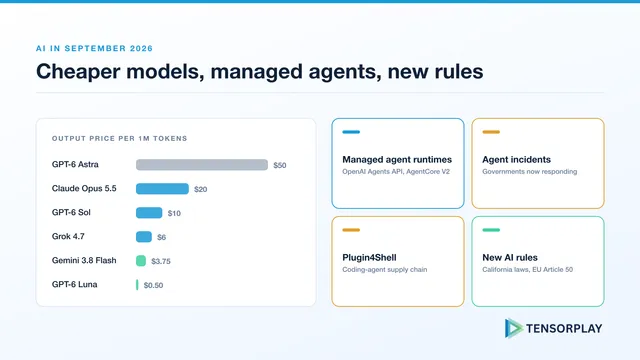
The AI news from September 2026 that matters to teams shipping AI: Claude Opus 5.5, GPT-6 Sol and Luna pricing, OpenAI's Agents API, Plugin4Shell, California's new AI laws and a migration checklist.
Turn prototypes into reliable, observable, and scalable AI systems.
Discuss your project