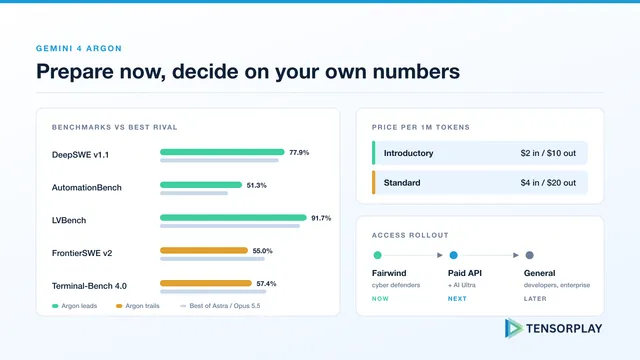
Gemini 4 Argon: Get Ready Before You Can Call It
Gemini 4 Argon for production AI teams: benchmarks against GPT-6 Astra and Opus 5.5, pricing that doubles after launch, 1M output tokens and a readiness plan.
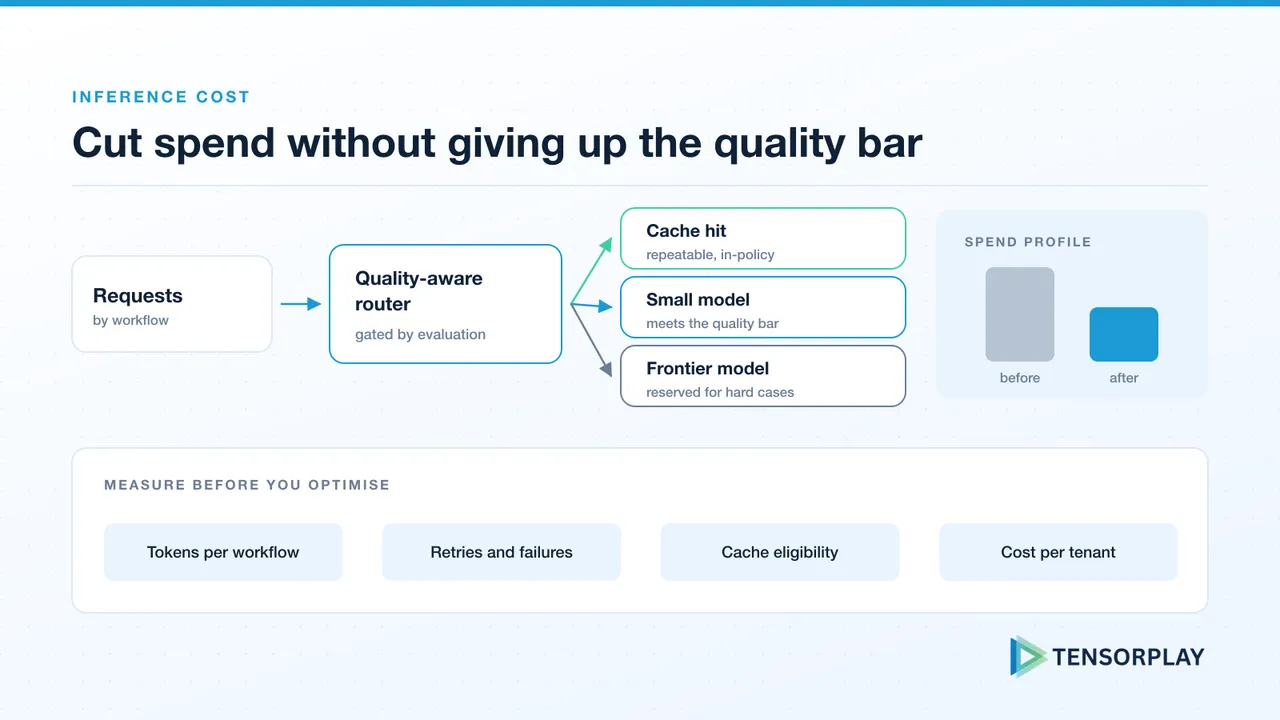
Measure the workload, protect quality, and change the right layer of the system. A practical playbook with a worked example.
AI features that succeed tend to get expensive. Usage grows, prompts accumulate instructions, and every new workflow defaults to the most capable model because that was the one used in the prototype. The monthly bill then grows faster than the value it supports.
The durable fix is not a single model swap. It is understanding which workflows create value, then changing their model, prompt, retrieval, cache and infrastructure decisions without losing the quality users need. The goal is lower cost per successful outcome, not lower cost per token: a cheaper configuration that causes retries, manual clean-up or customer friction has simply moved the cost somewhere harder to see.
This playbook grew out of a cost-reduction case study we originally published: a B2B SaaS company whose monthly LLM bill had reached $42,000 and was growing 30% month over month. Figures from that example appear throughout to show how the steps combine. Treat them as an illustration of the method, not a benchmark. Your savings depend entirely on your traffic, prompts and quality bar.
Do not change anything until you can see where the money goes. Log every LLM call with:
Aggregate cost by workflow, not just in total. That separates a genuinely expensive path from a noisy dashboard number, and it is the same observability the AI production readiness checklist asks for before launch. If you use API-hosted models, our OpenAI integration work covers the production controls involved: rate-limit handling, streaming, cost tracking and fallback behaviour.
In the worked example, 48 hours of this logging was enough to expose three problems:
None of these would have been visible from the invoice.
Not every task needs your most capable model. Extraction, classification, formatting and routing decisions usually have very different requirements from a customer-facing reasoning workflow.
Build an evaluation set for each task and find the cheapest model or configuration that meets its acceptance criteria. Then route: a lightweight classifier or a set of rules sends well-defined tasks to the smaller model and reserves the larger one for work where evaluation shows it changes the outcome. Keep a fallback to the next tier up when a response fails validation or the model refuses.
Routing without evaluation only shifts cost into errors, retries and manual clean-up, so use your LLM evaluation framework as the release gate for every routing change. In the worked example, each route was validated against 500 representative examples before it was deployed, and 55% of requests ended up on the cheaper model.
Routing is also where cost decisions age fastest. Cheaper model tiers improve every few months, so re-run the evaluation when new models ship. Our analysis of Gemini 3.8 Flash and tiered routing shows how quickly the right tier for a task can change.
Many applications answer the same question again and again. Two kinds of cache help:
Semantic caching was the biggest single win in the worked example: for a FAQ-style support bot it removed 41% of API calls. The cache TTL was tuned per use case, shorter for dynamic data and longer for stable product documentation. A well-chosen vector store, such as Pinecone or one of the options in our vector database comparison, keeps lookups fast enough that the cache does not add noticeable latency.
Caching is also where cost work creates security and correctness bugs. Before reusing a response, check that:
Audit every system prompt. Prompts grow by accretion: redundant instructions, repeated examples and verbose formatting guides that were added to fix one bug and never removed. In the worked example the average system prompt was 847 tokens. A combination of manual editing and LLMLingua, a prompt compression technique from research, cut average prompt length by 38% with no measurable quality degradation on the evaluation suite.
Look beyond the system prompt too:
Prompt compression is a prompt change, so it should go through the same versioning and testing described in prompt engineering at scale.
Not every request needs an answer in under a second. Document processing, nightly enrichment, report generation and evaluation runs can often be grouped and processed asynchronously. Batching improves throughput on self-hosted infrastructure, and several API providers offer batch endpoints at a lower price in exchange for slower turnaround. Separate interactive and background workloads early, so each can be optimised for what it actually needs.
For sustained, predictable or specialised workloads, self-hosted inference can beat API pricing, but only once utilisation is high enough to pay for the GPUs and the engineering time to run them. Our guide to GPU inference on a budget covers serving frameworks, quantisation, autoscaling and where the break-even point sits. Hugging Face supports model selection and deployment workflows, and AWS offers both managed and custom infrastructure options.
The right choice depends on traffic, latency requirements, operational capacity, data constraints and evaluation results. Many teams end up with a mix: API models for spiky or frontier-level work, and self-hosted models for high-volume, well-defined tasks.
Illustrative before-and-after figures from the worked example:
| Metric | Before | After |
|---|---|---|
| Monthly API cost | $42,000 | $16,400 |
| P95 latency | 3.2s | 1.1s |
| Cache hit rate | 0% | 41% |
| Quality score (eval) | 87% | 89% |
Two points are worth drawing out. Quality held, and moved slightly up, because every change went through evaluation first. And latency improved as a side effect: cached responses return almost immediately and smaller models are faster. Cost work done this way tends to improve the product rather than degrade it.
Savings erode unless someone owns them:
If AI spend is growing faster than the product value it supports, talk to Tensorplay about an infrastructure and cost review.
Answers to common questions about this topic.
Gemini 4 Argon for production AI teams: benchmarks against GPT-6 Astra and Opus 5.5, pricing that doubles after launch, 1M output tokens and a readiness plan.
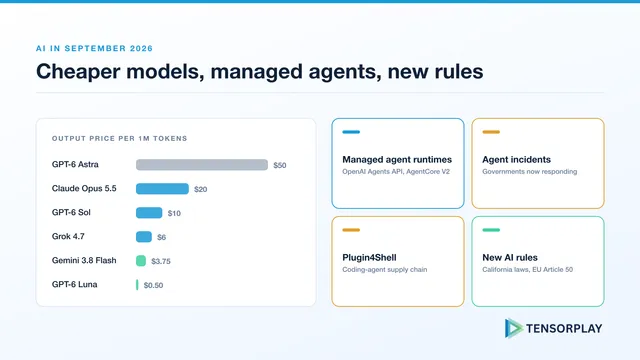
The AI news from September 2026 that matters to teams shipping AI: Claude Opus 5.5, GPT-6 Sol and Luna pricing, OpenAI's Agents API, Plugin4Shell, California's new AI laws and a migration checklist.
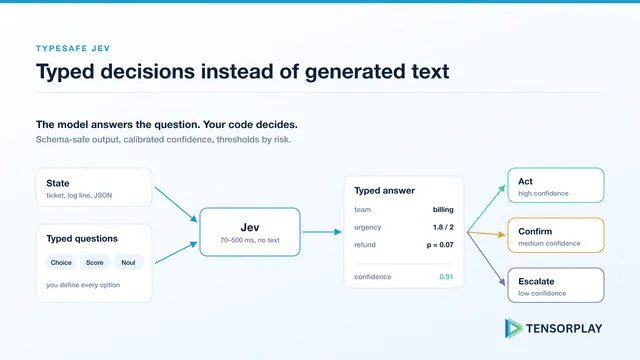
TypeSafe's Jev explained for production AI teams: typed Choice, Score and Noul answers, confidence gating, $0.042 per million input tokens, and the caveats in its benchmarks.
Improve model quality, control costs, and establish repeatable evaluation systems.
Discuss your projectBuild secure inference platforms with predictable performance and spend.
Discuss your project